Posted in 21st century job hunting, collaboration, digital parenting, parents and technology, teamwork

Multi-Generational Teams Do the Best Work

Have you been ever in a work situation where you feel especially old — as younger colleagues occasionally roll their eyes, proudly demonstrating their up-to-the-minute technology skills? Or maybe you’ve seen more experienced workers shoot down younger worker’s ideas. Lots of people in mid and late career periods, well people of all ages really, note these frustrations. It’s not all about age or technology — it’s about working together.

…and guess what?

Teams with differing ages and skills are often the most productive. While technology skills are important, collaborative skills and teamwork are more significant. In today’s fast-changing world, we are spending considerable effort teaching tech-savvy students how to work together with people who have differing perspectives and different kinds of ideas. Twenty-first Century employers are on the lookout for workers who can collaborate.

Sometimes older and more experienced team members offer points of view that add innovative problem-solving puzzle pieces to a team’s project. Younger workers can push limits and eagerly try new things. Older workers can also be skilled mentors. Skilled leadership, the ability to help people form a cohesive team, is a key to success.

Read, Why Multi-Generational Teams Are Bestover at bNet, the CBS Interactive Business Network.

Two broad reasons that a variety of age groups work together well and produce better results:                 Continue reading “Multi-Generational Teams Do the Best Work”
Posted in acceptable use, data collecting, data sharing, digital footprints, digital parenting, Do Not Track Kids Act, parents and technology, privacy

Kids’ Online Privacy Legislation – Will It Ever Happen?

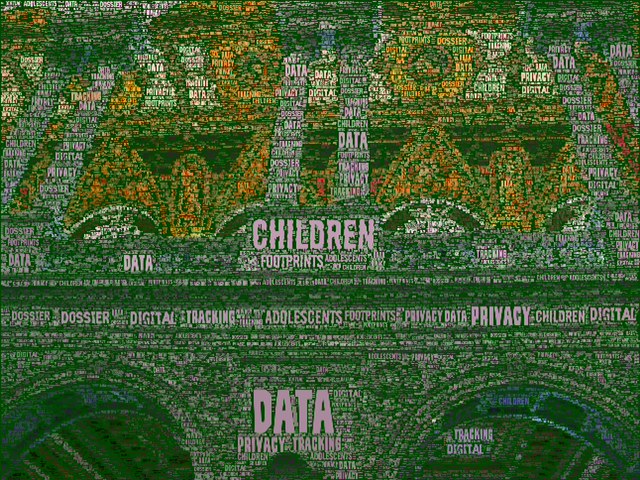
Image made with Wordfoto with a picture taken at the Library of Congress.

Much of what a child or teen does online gets added to a digital profile. Even when information is not supposed to be collected, it accumulates – somewhere. Moreover, when a child or adolescent acts impulsively or thoughtlessly online, no way exists to erase or delete a digital mistake. Harvard’s Berkman Center for Internet and Society posts a great digital dossier video that parents and educators may want to use as a conversation tool.

To learn a lot more about the state of privacy policy, especially as it concerns children and adolescents, read the article Congress Revisits Online Privacy Legislation over at Boston.com.

Continue reading “Kids’ Online Privacy Legislation – Will It Ever Happen?”

Posted in acceptable use, digital citizenship, digital parenting, online safety, parents and technology

Read 10 Simple Steps to Internet Safety at Common Sense Media

Check out 10 Simple Steps to Internet Safety over at the Common Sense Media website. Actually it looks like there are eleven items for parents to review at the page.

As always, Common Sense Media hits the nail on the head with clear, well written, and to-the-point parenting information. I’ve inserted a list of the questions.

Pay special attention to the two questions that I’ve listed below:

  • How do I teach my kids to recognize online advertising?
  • Should I let my kid get a Facebook page?
Posted in 21st Century Learning, acceptable use, conversations on commenting, digital citizenship, electronic communication, interesting research, parents and technology, social media, social networking, teaching digital kids

Online Etiquette Not the Greatest

 Check out the May 13, 2012 post, Online Etiquette Lacking, Study Finds, over at the  Techlicious blog

Writer Christina DesMarais describes a study that identifies irritating digital world behaviors such as communicating at inappropriate times, sharing too much information, and highly negative commenting — all related to our increasing use of 21st Century social media.

This article is filled with digital world conversation starters that parents and teachers can use to begin discussions about ethics, privacy, and security.

Also, you can check out my related post, Conversations About Commenting.

Posted in digital footprints, digital parenting, marketing to kids, media literacy, parents and technology, privacy, teaching digital kids

Can We Stop Confusing Kids’ Privacy with Transparency?

Our digital society hasn’t figured out what to do about privacy. More importantly, it hasn’t figured what to do about the privacy of our kids — we keep confusing privacy with transparency.

It’s problematic enough that adults are diving willy-nilly into the digital world, sharing everything about themselves, private and not so private, but it’s even worse to observe a world where everything a child does and almost every mistake he or she makes is now public. These days we are giving children and adolescents no cover and no protection as they blithely explore the digital world while making what in any other era would be common and developmentally appropriate errors.

Lest I sound like a digital Luddite, I’m not. I love participating in the activities of my digital world, actively but moderately, and I have an arsenal of digital gadgets in my purse, book bag, and lying around my house. As an educator, however, I am keenly aware of how much we are forgetting to nurture and honor kids’ developmental stages as they grow up in this digitally dense world. Part of solving that problem involves ensuring that children have a guaranteed amount of privacy.

Continue reading “Can We Stop Confusing Kids’ Privacy with Transparency?”

Posted in apps, digital devices and gadgets, digital parenting, parents and technology, privacy

Lots More People are Using Smartphone Location Services

Source: Pew Internet and American Life Project

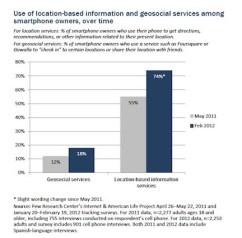
The Pew Internet & American Life Project has just published new survey results finding that 74% of smartphone owners — that’s three-quarters — appear to be using location services on their phones.

This statistic is double what it was when Pew conducted a similar survey in May 2011. The increase in location services occurs despite privacy concerns about tracking and data collection. Check out the report to look at the data by age, gender, and ethnic group, depicted in a range of charts and graphs.

I am still minimizing or turning off the number of location services that I use on my phone. While some of us use more location services than others on our smartphones, it’s critical for parents to know how location services work and how to limit access on the phones that their children around each day. Many apps ask to turn on location services during the installation process.

Do you know about Foursquare ? If it’s on an adolescent’s cell phone a parent needs to learn about it. Find out more about location services by reading a post that I wrote about location services, Location, Location, Location – Services that Is.

Each adult needs to figure out how much privacy is necessary or desired in his or her digital life and also in the digital lives of children. People seeking one right answer won’t find it, however, it’s best to take the time to understand the devices that family members carry and apps that they use.

Posted in 21st Century Learning, apps, assessing learning, digital learning, parents and technology

Wordfoto – Great Fun With Pictures and Word Lists

One of my sunflower pictures with words added for a presentation on professional development.

I have a new favorite app — Wordfoto. Interestingly it’s designed for an iPhone but does not yet have an iPad version.

With the Wordfoto application, I make a word list and then have some fun designing art. I select a picture as a background to highlight my words. I can use an image that comes with the app, I can use one of the pictures in my iPhone photo galleries, or I can take a new picture.

When I combine the picture and the word list — voila, a cool Wordfoto. The app comes with a variety of editing options, allowing users to play with the image, crop it, create styles, and fine tune the texture of the pictures. Wordfoto also comes with preset styles that introduce texture, color, and depth variations, making it easy for new users to get started.

Newly created images can be easily e-mailed, posted to Facebook, and more. Once e-mailed, the Wordfoto jpg images can be incorporated into other projects.

Potential uses? Spelling lists, messages and cards, vocabulary practice, event signs, and much more. The images will also be useful as illustrations for school reports, and I’m excited because I design occasional images for my blog posts.