Posted in acceptable use, apps, cell phones, digital devices, nothing is permanently erased, parents and technology

SnapChat: Instantly Deletable Images? Sort of…

Snapchat: the free mobile app that promotes itself as a disappearing act. Parents and educators need to know just enough to understand its attraction to children and adolescents and the potential problems that may occur

Teens and, yes, some tweens are now playing with Snapchat because it’s designed to make pictures disappear at their destination — in ten seconds or less.

I’ve tried to use the app, and pictures really do disappear. Voilà! The content is gone. So does this mean a child (or an adult) can go ahead and send all sorts of pictures?

Well, not exactly. Read A Warning about SnapChat, Teenagers, and Online Photo Sharing, appearing on February 11, 2013, over at the Forbes website.

After downloading and installing the Snapchat app on a mobile phone, a user chooses a picture, text, or drawing and decides how long to allow the picture to reside on the recipient’s screen — anywhere from 1 to 10 seconds. For Snapchat to work the sender must trust that the recipient will allow the picture to delete and that the recipient will be trustworthy and respect the wishes of the sender. Any user is supposed to be 13 or older.

So yes, the content does disappear, but even a picture residing for just a few seconds gives an unreliable recipient enough time to take a quick screenshot, preserving the image. Read this April 10, 2013 New Yorker article, Delete This Picture When You’re Done, by Matt Buchanan, who points out that the Snapchat site is handling over 60 million images a day. Another informative article is SnapChat: Sexting Tool or Next Instagram, a CNN report by Doug Gross.      Continue reading “SnapChat: Instantly Deletable Images? Sort of…”
Posted in acceptable use, digital citizenship, parents and technology

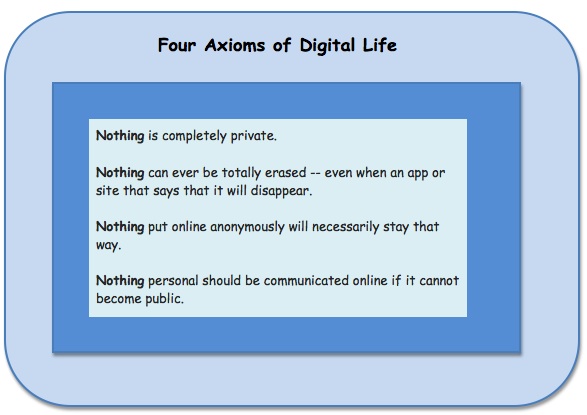
4 Axioms of Digital Life

four axioms

I keep thinking that grown-up politicians and celebrities will stop humiliating themselves when they use digital media.

But then another event occurs, and I am reminded that a good number of adults, just like many kids, have not absorbed four primary fundamentals or axioms of digital life.

  • Nothing is completely private.
  • Nothing can ever be totally erased — even when an app or site that says that it will disappear.
  • Nothing put online anonymously will necessarily stay that way.
  • Nothing personal should be communicated online if it cannot become public.

Continue reading “4 Axioms of Digital Life”

Posted in American Academy of Pediatrics, and media, digital kids, parents and technology, when tragedies strike

What to Say to Kids After We Are Saturated With Horrific Images

MD Momma
Check out helpful links for parents are at the end of this column.

We are all still reeling from the explosions at the finish line of the Boston Marathon.

For parents of digital kids, who with their children take all-the-time media access for granted, the greatest challenge is to figure out how to moderate what their youngsters see and hear in the days immediately following an event. It’s especially difficult because adults often want to be updated continuously by media resources.

Here’s a Boston Globe article with suggestions about how parents can help children feel safer and more secure after frightening events. Written by pediatrician Claire McCarthy for her MD Mama column, the piece also offers links to additional resources on parenting after scary, media-saturated events. Dr. McCarthy reminds parents that they can get their updates from smartphones and laptops rather than keeping a radio or television turned on.

shooting tips quote
This graphic links to the MGH article.

 Best Quote

        “…as parents, we don’t get the luxury of processing and dealing separately from our children.”

Massachusetts General Hospital, where many injured people were taken, has posted How to Talk to Kids Following the Boston Marathon Tragedy, including the excellent graphic on the left. 

You might also find it helpful to read blog posts, one that I wrote after the 2011 tsunami in Japan, Media Literate Disaster Discussions Balance Concern With Hope, and another, Talking to Children About the News.

Resources for parents and educators are also available at the American Academy of Pediatrics (AAP) website.

Posted in 21st Century parenting, acceptable use, American Academy of Pediatrics, digital devices and gadgets, digital kids, parent child conversations, parents and technology

9 Suggestions to Help Families Think About Digital Device Moderation

Designed using images from the Apple website.

I love my iPhone and iPad, and I cannot do many things without them. For children under 13, however, use time should be carefully monitored by each family. Kids today are playing independently with powerful devices, and they — the devices and the children — are not intended to interact in isolation and for long periods without adult supervision.

An article that provides food for thought, Your Phone Versus Your Heart, appeared in the March 23, 2013 New York Times. Also, check out the American Academy of Pediatrics media resources — the pediatricians are making recommendations because they know what they are talking about.

Just today I asked a group of device-savvy fifth graders, most around age 10, if they know anything about SnapChat, the app that deletes pictures in one to ten seconds (leaving plenty of time for a recipient with poor judgment to take a screenshot and save the photo). Just about every hand went up. During a lesson a few months ago I asked them how many of them know how to make a screenshot — and they can all do it in a lot less than ten seconds. Read my SnapChat review here.

A Few Social Media Supervision Suggestions            Continue reading “9 Suggestions to Help Families Think About Digital Device Moderation”

Posted in 21st Century Learning, 21st Century parenting, apps, digital devices, digital parenting, parents and technology

More Apps, More Experimenting, More Tween-Teen Public Mistakes

Image snapped on my mobile device.

Read Washington Post reporter Cecilia Kang’s April 6, 2013 article, Instagram Beauty Contests Worry Parents, Privacy Advocates, a piece that brings teachers and parents up to date on the current Instagram beauty contest craze among tweens and younger teens.

It’s all so simple. Combine normal growing up with unsupervised digital device apps and add in kids’ occasionally poorly thought-out decisions — and you have a recipe for problems. Many educators, who are aware on a daily basis of the increasing difficulties created by kids’ freewheeling app use, will tell you that it’s predictable. Also, it’s destructive to 21st Century learning communities.

An April 4, 2013 post, Beauty Is Only Skin Deep but Instagram Is to the Bone, by Huffington Post blogger Holly Actman Becker, offers a chatty but detailed romp through the current beauty contest experience from a mom’s perspective and with an interesting result. (Note: I enjoyed reading this post, but if you prefer your prose formal and straight-laced, this isn’t for you. I also wonder just how the author did not know that the minimum age is 13?)

Make no mistake –I love my digital devices. I enjoy using them, talking about them, and sharing information about how they work with my students. Moreover, I do not believe that children and adolescents should have their mobile devices taken away. (OK, a few of these children do need to have an old-fashioned time out from their new-fangled gadgets.)  Continue reading “More Apps, More Experimenting, More Tween-Teen Public Mistakes”

Posted in 21st Century Learning, 21st Century parenting, apps, parents and technology, QR coder, quick resource codes

QR CodeTutorial: Updated Post With Illustrations

QR Codes. You’ve probably seen them around — on everything from cereal boxes to magazines to advertising banners on the bus or in the subway.

QR is short for quick resource code (QR code), the scannable geometric-looking design that connects a person via smartphone to digital information such as an e-mail site, a video, a website, or even a telephone number. QR codes are similar to bar codes, but the QR image contains far more encoded information — thousands of times more, in fact. Learn more about QR codes at the Common Craft video tutorial site.

A QR code is essentially a shortcut that leads to digitized information. It might be, for instance, at the end of a book chapter, linking the reader to more content on a topic, or on a billboard. It could link conference attendees to a workshop handout or schedule. Continue reading “QR CodeTutorial: Updated Post With Illustrations”

Posted in 21st Century Learning, digital citizenship, digital citizenship minute, digital learning, educating digital natives, parents and technology

5 Digital Citizenship Moments: Adult Conversational Digressions for Kids

You have just shared several websites and take a moment to comment to children about digital footprints. Or perhaps you sent an e-mail that you wish you had not sent and you mention that it’s not possible to get something back once it’s sent out electronically. Maybe you open a website of poor quality and point out one or two things that could be improved.

These are moments, each probably less than a minute of conversational digression, that reinforce the digital citizenship habits of children. These comments can be incorporated into any discussion or lesson.

Each time adults comment on digital citizenship issues in the context of daily lessons and classroom life, we model a kind of digital intelligence that students can emulate and embrace, whether they are working or playing.

When educators and parents make time for digital digressions, moments of digital citizenship addressing crucial issues, they informally incorporate  behavioral values that are a part of 21st Century connected learning. More importantly, these moments allow children to observe that just about every digital activity incorporates time-tested values such as careful evaluation, respect, collaboration, and inclusiveness.

Five Digital Citizenship Moments to Incorporate into Any Conversation

1. Pause for a moment whenever you use a web site, and explain one or two things that you like about it (or don’t like). Or explain just how you found the website.

Continue reading “5 Digital Citizenship Moments: Adult Conversational Digressions for Kids”