Posted in acceptable use, digital parenting, home computer security, online security, parents and technology

Back-to-School Digital Reading Assignment #4: Online Safety Software Doesn’t Do It All

To Install or Not to Install — That is the Question!

When people ask me whether a family should install protection or filtering software at home, I always have one response. Protective software programs are fine, but limited. Yes, they keep a certain amount of inappropriate content away from children, but the problem of access to inappropriate content is not solved by simply protecting home computers and networks with software. Over the course of a day or week a child encounters many other connections to the world wide web — on laptops, smartphones, iPads, computers, in other people’s homes, and maybe even at a parent’s office. And many children simply figure out how to work around or even outwit the software.

Protecting children from bad content is critical, but they also need to know what to do and what strategies to use when confronted by the bad stuff. Does your child remember your expectations?  Will he or she know what to do?
Continue reading “Back-to-School Digital Reading Assignment #4: Online Safety Software Doesn’t Do It All”

Posted in digital parenting, home computer security, online security, parents and technology, urban legends

3 Sites to Help You With E-mail Hoaxes

… so please don’t forward the e-mails!

Use these web sites to verify strange stories that you receive via e-mail or view on web sites. Verify before you forward these stories to others — always — even if a story feels like it has to be true. Most of the time these stories are false, and sometimes they carry malicious code.

These sites cover the real story behind urban legends, hoaxes, myths or rumors.

Posted in digital parenting, online safety, online security, parents and technology, privacy

Disable or Limit Facebook Places: Eight Resources to Help

Just when we think we have a handle on a social networking, along comes another virtual gimmick to figure out. In this case Places is a Facebook mobile phone application designed to follow you around using the phone’s GPS, let people know where you are, and significantly reduce your privacy. Keeping a tight lid on anything tweens and younger adolescents do with Places will be a priority for parents this fall. A couple of suggestions…

  • Make Facebook Places a discussion topic and figure out a good time to talk with your family. Privacy is a concern, so don’t delay. With the start of the school year only a few weeks off, children with mobile smart phones will most likely try to make Places a part of their Facebook activities.
  • Think about the general Facebook and specific Places guidelines that you want to set for students in your family. Do this now, before Places becomes ingrained in the adolescent culture.

Continue reading “Disable or Limit Facebook Places: Eight Resources to Help”

Posted in digital parenting, online security, parents and technology, privacy

Protecting Privacy Online

On the web just about everything we do is recorded or tracked in some way. The digital footprints of our online lives are collected for all sorts of reasons, advertising primary among them, and while some companies collect data on individuals, others collect data and then combine information to identify trends. Either way, personal online privacy is eroded. Guiding children toward an understanding that nothing they do on the web is private is one of the greatest responsibilities of digital era parenting

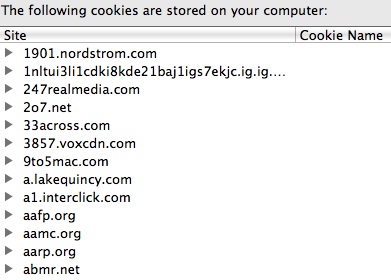
A few of the cookies on a computer.

The Wall Street Journal is publishing a series on privacy, describing how the digital documentation of our online lives is affecting our private lives and explaining the steps individuals and families can take to protect their privacy. A graphic in the series provides readers with step-by-step instructions to make Chrome, Firefox, Safari, and Internet Explorer protect privacy.

Another part of the Journal series, a July 30, 2010 article, Sites Feed Personal Details to New Tracking Industry, provides additional information about tracking, detailing the steps that occur when a group collects a user’s information and then sells that information to companies and advertisers.

Continue reading “Protecting Privacy Online”

Posted in acceptable use, Back-to-school digital reading, digital citizenship, digital parenting, parents and technology

Back-to-School Digital Reading Assignment, #2: Plagiarism

In an age of instant cut and paste, copying the words or ideas of others is easy, so today many students ignore the need to credit sources. According to an August 1, 2010, New York Times article, Plagiarism Lines Blur for Students in Digital Age, many digital natives have difficulty understanding the concepts of attribution, intellectual property, and copyright. Moreover, the article points out that, with so much public conversation and criticism about Wikipedia, many young writers believe that crediting the online encyclopedia is unnecessary.

The Times article is a helpful back-to-school read, because it clarifies a critical issue confronting students — one that affects the quality of their work. By addressing the need to cite sources and maintain personal integrity, parents provide solid support for their children, and they help children avoid problems that arise when Internet sources  in assignments without attribution. Family conversations need to occur early and often, building a child’s respect for digital citizenship.

Continue reading “Back-to-School Digital Reading Assignment, #2: Plagiarism”

Posted in acceptable use, digital citizenship, digital parenting, online safety, parents and technology

Facebook Safety Page – Bookmark It

According to a short article  in School Library Journal and a Facebook blog post, the world’s largest social networking site now has a new safety page as well as an advisory committee of well-known online safety organizations. Both articles offer Facebook users a detailed guided tour of the new site where teens, parents, and educators can go for up-to-date information.

Users can navigate to safety information in several ways. A Facebook safety page looks just like any Facebook page with useful links and a wall with a fairly lively conversation. This page will also post important documents, educational materials, and safety initiatives. Continue reading “Facebook Safety Page – Bookmark It”

Posted in acceptable use, digital citizenship, digital parenting, parent education, parents and technology, resources to read

Check Out Common Sense Media

Common Sense Media, a not-for-profit advocacy organization designed for families, offers trustworthy information, media evaluations, and all sort of online tools to help  parents, kids, and educators become more sophisticated consumers. Think of Common Sense Media as an information portal rather than a mere website. Parents, no matter the age of children in the family, can consult the organization’s web  site for age appropriate information about movies, current media events, digital citizenship advice, and much more. A separate part of the website provides information for educators and schools. Common Sense Media is  non-partisan, and you can learn more at the Common Sense Media FAQ.

A few of the organizational core beliefs (others can be found at the website) include: Continue reading “Check Out Common Sense Media”