As always, Common Sense Media hits the nail on the head with clear, well written, and to-the-point parenting information. I’ve inserted a list of the questions.
Pay special attention to the two questions that I’ve listed below:
How do I teach my kids to recognize online advertising?
Writer Christina DesMarais describes a study that identifies irritating digital world behaviors such as communicating at inappropriate times, sharing too much information, and highly negative commenting — all related to our increasing use of 21st Century social media.
This article is filled with digital world conversation starters that parents and teachers can use to begin discussions about ethics, privacy, and security.
Read my original post on digital citizenship minutes.
Each time teachers comment on digital citizenship issues in the context of daily lessons and classroom life, they model, as all adults should, a digital intelligence — just what we want our students to embrace, whether they are working or playing in the today’s world.
As educators pay increasing attention to these digital digressions throughout the school day, they demonstrate critical values of 21st Century learning — and life — in a networked world. But more importantly, our students observe that just about every learning activity these days, whether digital or not so digital, incorporates time-tested values such as thoughtful evaluation, respect, collaboration, inclusiveness, and acceptance.
Five Digital Citizenship Minutes to Incorporate into Any Lesson
1. Pause for a moment whenever you use a web site, and explain one or two things that you like about it (or don’t like). Or explain just how you found the website
2. Share an irritating or inconsiderate e-mail or cell phone moment — telling your students how it feels and why.
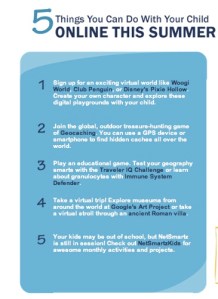
This set of summer digital activities, 5 Things You Can Do Online With Your Child This Summer, arrived in my e-mail a week or so ago. The list includes simple, but open-ended activities, each one enjoyable by itself, but with the potential to lead parents and children in many additional and enjoyable digital directions during the summer vacation. The ideas come from NetSmartz.
NetSmartz is an interactive and educational program for parents and kids, connected with the National Center for Missing & Exploited Children® (NCMEC). NetSmartz uses its considerable resources and clout to educate, engage, and empower children and their families about digital care and safety.
NetSmartz also features a wide range of digital safety educational resources for educators and law enforcement professionals.
No blog, though, at least not one that I can find. Puzzling since they provide some excellent information on blogging. Why not an example of what good blogging looks like — maybe one for parents and one for adolescents?
FBI Bunny helps me teach my students about digital citizenship and security.
Brian Krebs, over at the blog Krebs on Security, has posted 3 Basic Rules for Online Security. From his perspective, and I agree, just about everything can be distilled into these three guidelines. To read the more detailed explanations, head on over to his post. Keep these three rules in mind, day in and day out, as you work on your computer and your kids work on their devices.
If you didn’t go looking for it, don’t install it
If you installed it, update it.
If you no longer need it, remove it.
For those of us who wish we possessed a bit more of the “geekiness” factor (a term I use affectionately), these three rules, especially numbers one and two, should be household digital policy. While Krebs’ three precepts are broad, they will, if followed, prevent lots of computer trouble.
I will add a fourth rule for families. Digital parents, not their digital children, should administer the computers in a household, at least until a child has demonstrated a fair understanding about potential security problems. In my household, this included the ability to explain the basics of avoiding virus, spyware, malware, digital citizenship and digital footprint issues (also see rules one and two) and the ability to appreciate potential consequences. A child can learn a lot while administering a computer, however, before taking on the task, he or she needs to possess a strong sense of responsibility and the knowledge of what can go wrong.
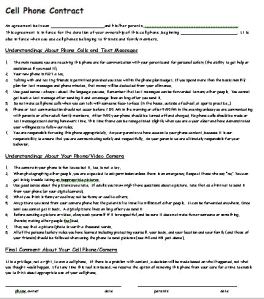
It’s May and every year at this time I work extensively with fifth graders on podcasts and other multimedia projects. Each year the students’ conversations drift toward their anticipation of sixth grade, middle school … and new cell phones. A connection exists, in their minds, between the first year of Middle School and getting the all-important digital accessory. Actually, the kids feel it’s an accessory, but their parents consider it a lifeline — something to keep them connected to their children whenever it’s necessary (and sometimes when it isn’t that necessary).

 Check out 10 Simple Steps to Internet Safety over at the Common Sense Media website. Actually it looks like there are eleven items for parents to review at the page.


 Media! Tech! Parenting!
You must be logged in to post a comment.