Good for middle school as well as older students. Parts of this video can be shared with fifth graders, but the whole video may a bit too scary for that age.
Parents, on the other hand, may consider this as an excellent resource for family conversations about digital life.
Inauguration Day photo taken by my friend and colleague, Maureen Boucher.
Events like today’s inauguration offer teachers and parents unique opportunities to demonstrate what connected learning is all about in the 21st Century. In my house, Inauguration Day 2013 was filled with digital connections.
We turned on the television around 10:30 this morning and did not turn it off until mid-evening — unusual for us. We also tuned our radios to NPR. A laptop, iPad, and iPhone finished out our Inauguration Day 2013 connections.
When we had things to do around the house we listened to our radios, though I kept my iPhone nearby to check on Facebook friends at the Capitol and along the parade route. When we sat in front of the television, I also used my laptop and iPhone, and my husband used his iPad.
Throughout the day we heard and responded to Facebook pictures and comments, and I often used my iPhone to respond to text messages from friends who shared observations from the Mall. While I thought about tweeting, the tweets were coming in so fast and furiously under the inauguration hashtags that I could not possibly read many of them while multi-tasking on my other devices, so I skipped Twitter for the day.
Flu is here and for the next couple of months so many of us will need to take precautions to prevent, if possible, getting sick. Your family will probably have a few conversations about the flu, so here are some data-rich public health websites to use as a part of the conversation with 21st Century learners.
Some influenza seasons are worse than others, and this year appears to be more severe than the last few flu seasons. But no matter what year it is, it’s doubly important to help children and everyone else in your family avoid influenza exposure as much as possible — and no one should get very far into the fall months without receiving a vaccination at a physician’s office, pharmacy, or local clinic.
Google Flu Trends Data Map
Today I went to Google Flu Trends to learn where in the United States influenza is hitting the hardest, and right now this dynamic mapping site indicates that the flu is just about everywhere. Google collects its data by keeping track of internet searches for symptoms such as fever, headache, or sore muscles. The collected search statistics turn out to be good predictors of what parts of the country are experiencing influenza-like illnesses.
Right now, January 18, 2013, the Google flu map shows that the flu is widespread — almost every state in the U.S. is the same bright red color, indicating that lots of people are sick with the flu and searching to learn more. A user can click in each state to look at the influenza-related searches from there. Click on the map to visit Google Flu Trends to see what it looks like.
CDC Data Map
The data depicted by Google Flu Trends often corresponds to, but is not a substitute for, the hard data that the Centers for Disease Control and Prevention (CDC) receives when epidemiologists from around the country collect and submit data about actual diagnosed influenza cases in their states. In tracing the course of an epidemic, epidemiologists and health officials need to collect the specifics about place and time of an illness as well as general characteristics of the people who are sick (age, gender, ethnicity, seriousness of illness, pre-existing health conditions, etc.).
At this time, Google Flu Trends, while predictive of case counts, does not provide public health officials enough detailed information. Look at the CDC Influenza Summary Update.
Sometimes when I sit quietly in a computer lab at school and observe my students, I overhear the most wonderful conversations about learning. Today, as I sat in a corner working quietly, several fifth-grade students came in and sat down to work on essays. Focused on work, they took little note of me.
A delightful conversation ensued when one student asked the other student for help with the name of a country. As soon as I realized that an interesting 21st Century learning conversation was happening, I started typing their dialogue rather than my parent letter.
The two children went online together, searched, made all sorts of comments and decisions about what they saw, discovered a few things that they were not looking for, and finally located the information that they needed. But their searching led to additional questions.
The entire conversation lasted less than two minutes, but they learned a great deal.
Student #1: I am trying to write about the country that broke off from India when India became independent. Do you know its name?
Student #2: I’m not sure. I know it’s right next door.
Student #1: Hummm. Maybe it’s Pakistan? But I’m not sure.
Student #2: Maybe. Let’s go online and find a world map.
Student #1: OK. Are you going to Google it?
Student #2: Yes and look. If we go into Images there are lots of maps.
At this point the two students are both looking at dozens of world maps on Google Images and pointing at some of them. They talk about which map to look at. They choose one, but when the enlarge it, it doesn’t work. Continue reading “Now This Is What You Want Connected Kids to Do!”→
After reading a January 5, 2013 post on Edudemic, How and Why Teachers Should Blog, I want to share a blogging experience at my school.
I have the honor of working with a small group of amazing third-grade teachers — my colleagues — and last summer they decided to begin blogging with their students. This past fall each of the teachers set up a classroom blog at KidBlog. This student-oriented blogging site is designed to offer maximum privacy to young writers, but it also offers the opportunity for more access — and more readers — if desired. Interestingly, while the three classroom blogs are all similar, each has slight variations that reflect the personalities of the kids and the ideas of the teacher.
Visit KidBlog!
After orienting their students to the idea of blogging — discussing appropriate tone, privacy, and respect — the teachers let the children write. Third graders have learned to read one another’s work and make comments and suggestions. Sometimes they share complete stories, and at other times they write more spontaneously.
Although I am a big fan of encouraging students to begin any research project with curated resources such as the online databases at a school or public library, I know that many learners head straight for Google.
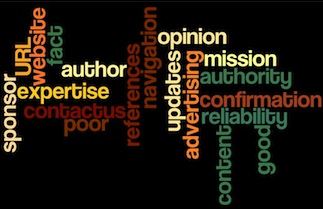
When students make garden-variety searches on Google, teach them to investigate and ask questions about what they find, especially if they are planning to use a website to learn more about a topic. The strongest 21st Century learners will make the process of asking evaluative questions second nature — examining each and every site before deciding whether or not to use the information.
Wikipedia is cool, Wikipedia is filled with information, and Wikipedia is great fun to visit.
That said, reminding children about the authority of references and the expertise of authors — whenever children begin research — is an important part of teaching and parenting. A critical 21st Century and life skill is understanding how to go about judging the quality of references and especially learning how to figure out when information is not up to snuff.
If students start out a project by looking up a topic on Wikipedia, and many of them do, they should hear — over and over at every age — about the importance of seeking out and reading other resources to confirm the facts. Adults, too, need to make this a habit.
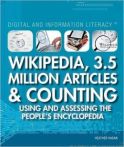
Image from Amazon site.
A new book, Wikipedia: 3.5 Million Articles and Counting, offers parents and educators a great opportunity to read together and learn more — lots more — about Wikipedia. Author Heather Hasan writes in detail about the history and philosophy of this mammoth open-source encyclopedia, explaining how Wikipedia works and describing how the editors keep track of new entries, edits, and re-edits.
Hasan points out the ways that Wikipedia writers occasionally argue over topics, and she notes that editors often decide to lock down a subject or entry. Other short sections of the book share Wikipedia facts and myths, a glossary, and several pages of bibliographic references.
If you read this book with children in your family or students in your class, be sure to have continuing conversations, both while reading the book and afterwards, about the importance of expertise and authority, pointing out that another reason to confirm the facts — aside from worrying about misinformation — is to learn whether even the experts disagree.
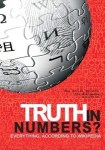
An excellent Wikipedia documentary, Truth in Numbers, is available at Amazonand includes interviews with many of the people who have helped the Internet to develop and grow — the movers and shakers of the World Wide Web.






 Media! Tech! Parenting!
You must be logged in to post a comment.